SAM2 Video Segmentation Inference on Jetson Orin Nano
Introduction
Notes on running SAM2 video inference on Jetson Orin Nano
Environment Specifications
Hardware and Software Configuration
- Board: Jetson Orin Nano Super
- FW: Jetpack 6.2
- OS: Ubuntu 22.04
- CUDA Toolkit: 12.6
- cuDNN: 12.6
- Python: 3.10
Creating PyTorch+Transformer Container for Jetson
1. Basic Setup
git clone https://github.com/dusty-nv/jetson-containers.git
bash jetson-containers/install.sh
CUDA_VERSION=12.6 jetson-containers build l4t-ml transformers
- Create l4t-ml (pytorch+etc) + transformers environment
2. Handling Memory Issues During NCCL Build
Solution for Out of Memory errors during NCCL build:
Target File: packages/cuda/nccl/build.sh
Modification:
make -j2 src.build NVCC_GENCODE="-gencode=arch=compute_87,code=sm_87"
make -j2 pkg.txz.build NVCC_GENCODE="-gencode=arch=compute_87,code=sm_87"
- Limit job count to 2 to reduce memory usage
- Build takes approximately 8 hours
3. Starting and Verifying the Container
jetson-containers run --volume /ssd/work:/work --workdir /work $(autotag l4t-ptx-transformers)
- I created the above image as l4t-ptx-transformers
Environment Verification:
pip list
- If PyTorch, transformers, etc. are installed, the build is successful
- If
nvidia-smiworks, it’s OK. Jetson has GPU as SoC, so it shows N/A - You can enter the container even if it failed during build, in which case libraries will be missing
SAM2 Installation
1. Clone Repository
jetson-containers run --volume /ssd/work:/work --workdir /work $(autotag l4t-ptx-transformers)
git clone https://github.com/facebookresearch/sam2
2. Setup
- Follow the official repository to install checkpoints, etc.
- For Jetson, large models may have memory issues, so use lightweight models
- If OOM occurs during video loading causing kernel crash, optimize memory
- Follow the steps here: https://bone.jp/articles/2025/250125_JetsonOrinNanoSuper_4_memory
Lightweight Model Configuration:
sam2_checkpoint = "../checkpoints/sam2.1_hiera_tiny.pt"
model_cfg = "configs/sam2.1/sam2.1_hiera_t.yaml"
Running ipynb in Docker Environment
Use VSCode. Prerequisites: Dev Container, Docker, and Jupyter extensions
1. Jupyter Environment Setup
jetson-containers run --volume /ssd/work:/work --workdir /work $(autotag l4t-ptx-transformers)
pip install jupyterlab ipykernel
python -m ipykernel install --user --name jetson-docker
2. Connecting to Container in VSCode
Ctrl + Shift + P→Dev Containers: Attach to Running Container- Select the running l4t-ptx-transformers
- A new window opens. If “Container jetson_container…” appears in the bottom left, it’s OK
3. Setting Working Directory
File→Open Folder→/work- Note: Type “work” manually as it doesn’t appear in suggestions. This is a common pitfall
- Now you can open ipynb notebooks in VSCode within the container environment
Running SAM2 Video Predictor
1. Notebook Preparation
cd ./sam2/notebooks
- Open video_predictor_example.ipynb in GUI
2. Kernel Selection
- Select Kernel (top right) → Jupyter Kernel → jetson-docker
- If not available, restart VSCode and it should appear
3. Execution and Troubleshooting
- Execute normally and it should work
- Common issues with l4t-ml + transformer container:
Common Problems and Solutions:
- opencv, matplotlib missing
pip install opencv-python matplotlib - numpy is not available error
- Seems to be a pip-side numpy version error. Setting pip-side numpy to 1.26 fixed it
pip uninstall numpy python3 -m pip install -U pip - Restart Kernel
- Seems to be a pip-side numpy version error. Setting pip-side numpy to 1.26 fixed it
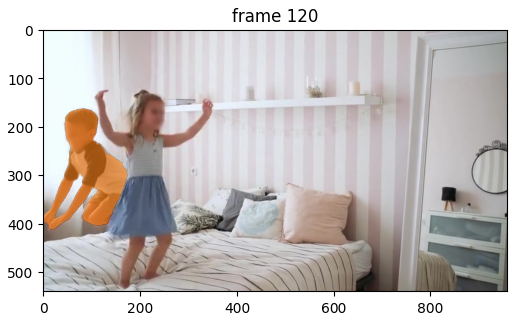
4. Execution Result
It worked!
GPU Resource Monitoring
Monitoring with tegrastats
- GPU usage can be checked with
tegrastats - GR3D_FREQ shows Jetson Orin GPU resource consumption
- Check with
tegrastatsduringpredictor.propagate_in_videoexecution. If GPU resources increase, SAM2 is processing on GPU
Execution Example:
[2%@1728,44%@1728,4%@1728,30%@1728,4%@729,3%@729] **GR3D_FREQ 99%** cpu@54.468C soc2@52.687C soc0@53.406C gpu@55.093C tj@55.093C soc1@52.718C VDD_IN 18426mW/7206mW VDD_CPU_GPU_CV 7601mW/922mW VDD_SOC 5651mW/3175mW
08-24-2025 17:49:08 RAM 7124/7620MB (lfb 1x1MB) SWAP 3906/20194MB (cached 159MB) CPU
→ Running at 99%
Other Notes
- Using this Docker environment, you can also run SLM (llama-3 on Hugging Face) normally